1A Auto: Parts & Repair Videos
- 4.3
- Rating
- 100.00K
- Installs
- Free
- Price

 Analysis by App-foxy
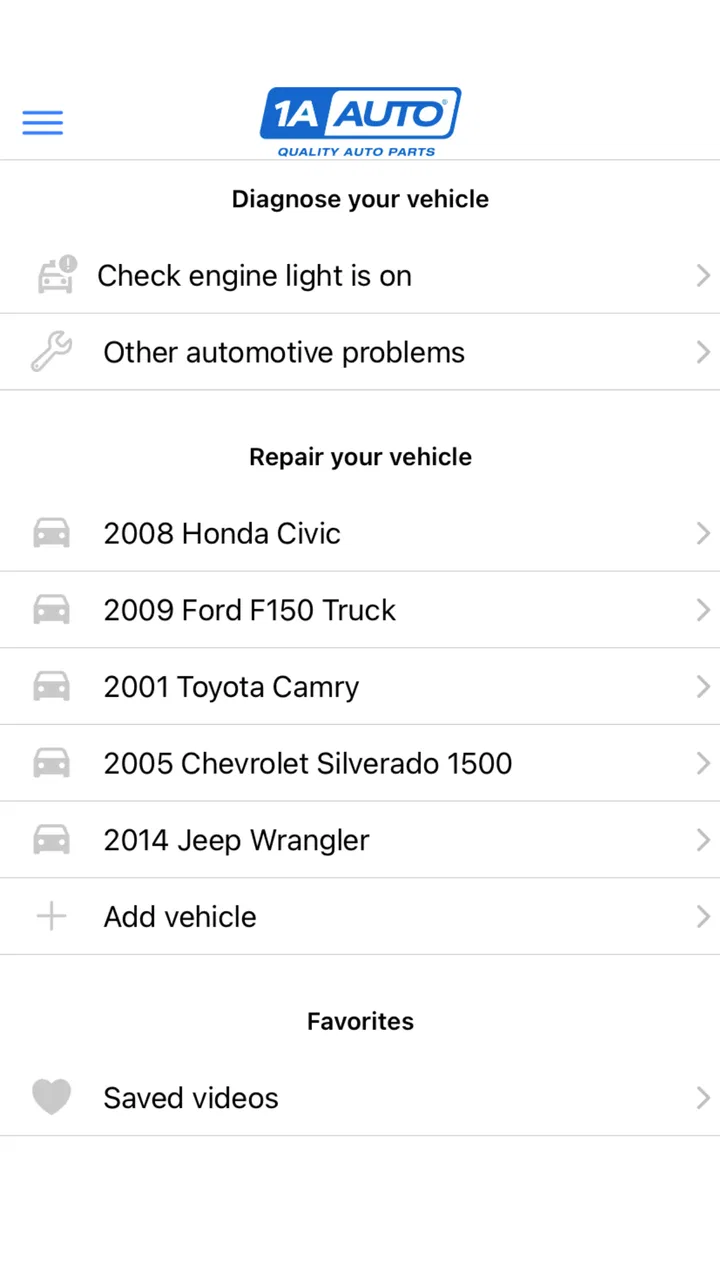
If you are trying to repair your own car for the first time, the hardest part is often not turning a wrench. It is figuring out which part you need, whether it actually fits, and what the job should look like before you start. 1A Auto: Parts & Repair Videos is built around that DIY problem. It combines access to replacement parts with repair guidance from TRQ Auto Parts, giving you a more practical starting point than a general search engine.
I found the app most useful when I treated it as a preparation tool rather than a complete substitute for mechanical knowledge. It can help you move from “something is wrong with my car” to a clearer plan: identify the likely repair, look at the relevant video, and decide whether the job is realistic for your tools and experience. That makes it especially approachable for a first-time DIY owner who wants reassurance before buying anything.
What to expect before you begin
This is a free Auto & Vehicles app, rated for Everyone, and its focus is quite specific. You are not opening a broad automotive social network, a roadside assistance service, or a driving utility. The useful part is the connection between DIY car repair videos and the parts needed for common maintenance and repair work.
You May Also Like

 Google Keep - Notes and lists
Google Keep’s Quiet Growth Shows the Appeal of Simpler Notes
As mobile work gets busier, Google Keep keeps winning a simple contest: capture a thought quickly, find it later, and get on with the day.

 Blood Strike: 2.5 Anniversary
Blood Strike’s Loadouts Turn Every Drop Into a Tactical Gamble
A close look at Blood Strike’s custom loadouts: how fast access to signature weapons reshapes its battle royale rhythm, rewards preparation, and narrows the gap between fights.

 Pandora - Music & Podcasts
Pandora’s Music Is Easy to Start, but Harder to Recover
Pandora’s strength is its low-effort path from a seed to a station. Its weak spot is how much confidence it asks you to place in connection, setup, and quiet recovery.

 8 Ball Pool
 Is Built on Rivalries, Rematches, and Routine
A close look at the rivalries, rematches, shared routines, and unanswered safety questions that turn a quick pool match into a persistent mobile community.

 Samsung Music
’s Quiet Strength Is Playing What You Already Own
Its reach comes less from spectacle than from dependable access to a personal library. That simplicity is both the app’s strongest retention engine and its ceiling.

 AccuWeather: Weather Radar
AccuWeather Review: A Quick, Clear Forecast for Everyday Decisions
For everyday plans, the best forecast is the one you can understand quickly. AccuWeather makes rain timing, radar, and local conditions easy to act on, with a few trade-offs.
More From Our News Desk



The app was released on September 13, 2022, and the current version is 2.2.9. It requires Android 7.0 or later, so it is suitable for many older Android phones as well as newer devices. On the store, it has a 4.3 average from around 274 ratings, with roughly 103 written reviews and over 100K installs. Those figures suggest a meaningful user base, although I would still judge it by whether its repair coverage matches your vehicle and the job you want to attempt.
The developer is TRQ Auto Parts, a name that matters here because the experience is centered on its own automotive parts catalog and instructional material. That gives the app a clearer purpose than a generic video platform, but it also means I would not expect it to cover every make, model, engine, or unusual fault equally well.
My first recommendation is to install it with a specific problem in mind. “I want to learn about cars” is too broad and makes it difficult to tell whether the app is helping. A better starting point is something like a noisy front wheel, a failed mirror, a worn brake component, or a warning sign you are already investigating. With a defined task, the videos and parts information become much easier to evaluate.
The app is also better suited to planned work than emergencies. If your car has stopped in an unsafe location, you need roadside help or a qualified mechanic rather than an app-based research session. Likewise, if the issue involves fuel leaks, high-voltage systems, airbag components, or a vehicle that is unsafe to lift, a video should not be treated as permission to proceed.
Setting up a useful repair session
After installing the app, I would begin by keeping the vehicle information close at hand. Write down the make, model, model year, trim if you know it, and engine details. Vehicle compatibility is one of the most important parts of ordering automotive components, and a small difference between two versions can change the correct part completely.
Rather than browsing randomly, search for the repair in plain language. Think in terms of the symptom or component: a window regulator, a headlight assembly, a control arm, or a brake-related job. If you already know the part name, use it. If you only know the symptom, use the video results to learn the terminology before making a purchase.
This is one of the app’s most useful learning patterns: use the video to improve your diagnosis, not just to copy the hand movements. A tutorial may show how to replace a component, but the fact that the replacement is possible does not prove that component is the cause of your problem. A clicking sound, for example, can come from several areas. The video can show access and installation while your diagnosis still needs to come from inspection, testing, or professional advice.
Before starting a job, I would watch the relevant material once without tools in hand. Pay attention to the order of disassembly, the connectors or clips that need care, and whether the work requires lifting the vehicle. Then watch it again while making a short checklist. This two-pass approach is more useful than constantly pausing a phone covered in grease.
A practical setup is to place the phone somewhere visible but away from moving parts, fluids, and the area where you will swing a tool. If you are working in a garage, a second device or a printed checklist can be helpful because repeatedly touching the screen with dirty gloves is frustrating. The app can guide the process, but it cannot make a cramped workspace safer.
The first meaningful success
For a first attempt, I would choose a repair with clear visual steps and limited consequences if you need to stop. Replacing a visible exterior component or a straightforward bolt-on item is generally a more reassuring learning experience than beginning with a job where incorrect assembly affects steering, braking, or restraint systems.
Once you find a suitable video, compare its vehicle details with your own before ordering a part. Look for differences in body style, engine, position, and production changes. Do not assume that a part described with a familiar name is automatically correct for every version of a model. The most expensive mistake in DIY repair is often not the installation itself; it is buying the wrong component and discovering the mismatch after the car is already apart.
I also recommend taking photographs before removing anything. Capture connector positions, hose routing, fastener locations, and the orientation of the old part. This is especially useful when the tutorial moves quickly or when your vehicle has a slightly different layout. The photos become your own reference, while the app supplies the broader sequence.
Keep removed hardware organized by stage. A small container or labeled bags can prevent the classic first-time error of finishing the repair with one unexplained bolt. If the video shows a fastener being removed from a particular location, label it immediately. This simple habit adds more confidence than watching another tutorial after the fact.
When the part is installed, do not rush to close the hood and take a long drive. Recheck connectors, clips, hoses, and visible fasteners. Test the repaired function in a controlled way, and listen for anything new. If the repair affects steering, braking, suspension, or wheel mounting, a cautious inspection and professional check are sensible before normal driving. The app can make the work understandable, but responsibility for the final safety check remains with you.
Where beginners can become confused
The biggest source of confusion is the difference between a repair tutorial and a diagnosis. A video may be excellent at showing access to a component while saying little about whether that component has actually failed on your car. If you search only by symptom, you may find several plausible repairs. Use that uncertainty as a reason to investigate further, not as a reason to buy the first part that appears.
Another common problem is assuming that a visually similar vehicle is identical. Tutorials may show a configuration that looks close to yours but has a different connector, bracket, sensor, or mounting point. Before following the steps, compare the visible details in the video with your own car. If the layout differs in a way you cannot explain, pause the project instead of improvising.
Part terminology can also be surprisingly inconsistent. One person may call a component a window motor, while another refers to the complete window regulator assembly. Similar names can describe different levels of replacement. I would read the part description carefully and compare the item with what is physically installed in the vehicle. If you need only a motor but order a complete assembly, the job may still be possible, but the cost and installation process can change.
It is also easy to underestimate seized fasteners, rust, and access problems. A clean instructional video cannot fully represent how stubborn an old bolt will be on your particular vehicle. Leave time for penetrating fluid, replacement hardware, or a trip to a parts shop. If a fastener begins rounding off or a component will not separate safely, stopping is better than turning a manageable repair into a damaged hub, bracket, or connector.
Some jobs require tools that a beginner may not own. A tutorial can make a task look simple because the presenter already has the correct sockets, extensions, supports, and specialty tools arranged nearby. Before buying a part, check the tool requirements and decide whether borrowing or renting equipment makes sense. The cheapest part is not necessarily the cheapest repair if you need several tools for one job.
Finally, do not interpret a confident presentation as a guarantee of success. I liked the app’s practical orientation, but I would still cross-check critical specifications with the vehicle manual or a trusted repair reference. For torque values, fluid types, adjustment procedures, and safety-critical assemblies, the vehicle-specific documentation should have priority over a general demonstration.
A realistic first-time scenario
Imagine that your exterior mirror has been damaged and you want to replace it yourself. I would first record the vehicle details, then search for the mirror replacement rather than searching only for “broken mirror.” After finding a relevant video, I would check whether the tutorial shows the same door layout and electrical connections. I would inspect the replacement description and compare the mounting shape before ordering.
On repair day, I would watch the full procedure, photograph the door panel and connector arrangement, and place removed screws in a labeled container. The video would help me understand where the trim releases and in what order the mirror is detached. After fitting the new unit, I would test adjustment and any integrated functions before reinstalling every panel.
This scenario shows where the app earns its place. It reduces uncertainty at three separate points: identifying the likely component, judging the difficulty, and remembering the installation sequence. It does not eliminate the need to verify compatibility or inspect the finished work, but it makes a first attempt feel planned instead of improvised.
How it compares with ordinary alternatives
A general video platform may offer a larger range of automotive content, including independent mechanics, owner forums, and unusual repairs. That breadth is useful when your vehicle or symptom is uncommon. The trade-off is that search results can be inconsistent, and you may spend more time sorting through videos that do not match your exact configuration.
A vehicle forum can be better for strange noises, intermittent electrical faults, and model-specific quirks because owners often discuss what happened after a repair. However, forums can be difficult to follow, and advice may be scattered across long conversations. The focused combination of parts and repair videos is more convenient when you already have a reasonably clear job.
A printed workshop manual or official service information remains stronger for exact specifications, diagnostic procedures, and safety-critical details. Those references are less friendly for a beginner, though, and they may not show the physical hand positions or trim-removal technique that make a job understandable. I see this app as a practical visual companion, not a replacement for formal service documentation.
A local parts counter can help confirm fitment and suggest tools, while a mechanic can diagnose problems that are beyond your confidence. The app is most valuable between those options: it helps you decide whether a repair is approachable and prepares you to ask better questions if you do need professional help.
Who will get the most from it
I would recommend it to owners who want to learn through visual demonstrations, people maintaining an older daily driver, and beginners who are willing to prepare carefully. It is particularly useful when the repair is identifiable and the main obstacle is understanding access, sequence, and part selection.
It is less suitable for someone looking for live diagnosis, emergency assistance, or a complete maintenance schedule. It is also not the right first choice for repairs involving serious safety risks if you have no experience, no proper lifting equipment, or no way to verify the result. In those situations, a qualified technician is the better option even if the video makes the procedure look manageable.
Experienced mechanics may find the instructional side too basic for familiar jobs, but the parts-focused workflow can still save time when checking a replacement. For unusual vehicles, heavily modified cars, or faults that do not point to one component, a specialist forum or manufacturer documentation may provide more useful detail.
My next-step advice after installation
Once you have completed one simple repair, do not immediately move to the most complicated job in the catalog. Use the first experience to build a personal process: confirm fitment, watch before disassembly, photograph the original arrangement, organize hardware, and test the result carefully. That routine is more transferable than memorizing one particular repair.
You can also use the app to decide when not to proceed. If the required tool is unavailable, the vehicle differs from the tutorial, the diagnosis is uncertain, or the repair affects a safety-critical system, the useful outcome may be recognizing that you need a mechanic. A good DIY resource should help you set limits as well as remove hesitation.
Because the app is free, it is easy to keep available as a reference without committing money before you understand the job. I would install it before shopping for a part, not after. That way, the video can influence whether you buy the component, gather tools, or abandon the repair in favor of professional service.
My overall impression is positive, with a clear boundary. 1A Auto: Parts & Repair Videos gives first-time DIY owners a calmer route from a repair idea to a workable plan, especially when the vehicle and component are easy to identify. Its real strength is the combination of visual guidance and parts context; its main limitation is that no catalog-driven tutorial can replace diagnosis, vehicle-specific verification, or safe mechanical judgment.
If you approach it as a preparation and learning aid, I think it is worth trying. Start with one clearly defined, low-risk repair, verify every compatibility detail, and treat the video as guidance rather than a guarantee. Used that way, this Auto & Vehicles app can turn a nervous first project into a structured experience while still leaving room for the most important decision of all: knowing when the job belongs in a professional workshop.
FAQs for 1A Auto: Parts & Repair Videos
01What is 1A Auto: Parts & Repair Videos?
1A Auto: Parts & Repair Videos is a comprehensive app designed to assist car owners in repairing and maintaining their vehicles. It offers a wide range of video tutorials, covering various car makes and models, to help users perform repairs and understand car parts better. The app is suitable for both novices and experienced DIY mechanics.
02Is 1A Auto: Parts & Repair Videos free to use?
The app offers a free version that provides access to a broad selection of repair videos and instructional content. However, there may be premium features or additional content available through in-app purchases. Users should check the app store for specific pricing details and any subscription options that might enhance the app experience.
03What types of vehicles does 1A Auto cover?
1A Auto: Parts & Repair Videos covers a wide variety of cars, including popular makes and models from manufacturers like Ford, Toyota, Chevrolet, Honda, and more. The app continuously updates its content to include the latest vehicle models and repair techniques, ensuring users have access to current and relevant information.
04How frequently is the app updated with new content?
The app is regularly updated to include new repair videos, covering the latest vehicle models and repair techniques. Updates also aim to improve app functionality, fix any bugs, and enhance user experience. Users can expect regular content additions that keep the app relevant and useful for ongoing vehicle maintenance.
05Can the app help with diagnosing car issues?
Yes, 1A Auto: Parts & Repair Videos can assist in diagnosing common car issues. The instructional videos often include tips on identifying symptoms and troubleshooting problems. While it is a valuable resource for DIY diagnostics, users should also consider consulting a professional mechanic for complex or unclear issues to ensure safety and accuracy.
Pros
- Detailed repair videos are easy to follow.
- Comprehensive parts catalog for various models.
- User-friendly interface simplifies navigation.
- Regular updates keep content fresh.
- Search feature quickly finds needed parts.
Cons
- Some videos lack advanced repair techniques.
- Occasional app crashes disrupt usage.
- Limited offline access to content.
- In-app ads can be distracting.
- Requires stable internet for video streaming.

1A Auto: Parts & Repair Videos
Gallery